Thursday, August 7, 2014

Tips & Tricks: Using external PY modules in our FDMEE Scripts

Hi all,

some time ago someone (I will call him Agent Brody from now on) asked in the community forum about having multiple BefImport event scripts... Is that possible?

In FDM Classic we could use API function SCRIPTENG.fCompileScript for that purpose. In that way we could have one master script calling functions/subs declared in other "slave" scripts as needed.
Good approach for implementing a custom library function that you could port from one customer to another. Definitely, that solution was helping us to improve our scripting model and maintenance... a lot.

So in our process of forgetting FDM Classic, we may be wondering about same functionality in Jython...

There are different ways but I don't want to go into much detail today. If we think from programming perspective, I would be thinking in having different Jython scripts (py files) so I can call functions declared in script A from script B...that's all.

How can I do this in Jython? Luckily we have the import statement which you can read about in Jython's site.
We will start with a simple custom library called BefImport_Lib.py which has one function declared. This function will show a message to the user. As I will be using the API function fdmAPI.showCustomMessage, I need to pass fdmAPI object as parameter to that function.
As a simple test, I just want to show a message when running the BefImport event script.

What steps do I need to perform?
  1. Import sys module
  2. Append folder with custom library to sys.path (so Jython can find the custom library)
  3. Import our custom library BefImport_Lib.py (so we can use functions declared in it)
  4. Call function customShowMsg(fdmAPI) defined in the custom library


You have more details in link above about how Jython works internally when importing modules. In a simply way, the objects within the sys.path list tell Jython where to search for modules.
So let's run our import step in FDMEE...
Let's have a look to the folder where custom library resides:
What is that BefImport_Lib$py.class?
In simple words, Jython compiles the custom py module when the module is imported and the function is called. As result you have this pretty $py.class file :-)

After I change code in my custom library...the old code is still being used!!!
First thing you notice when working with your custom library is that you need to append new code as needed or maybe you are my hero and you get all working with no errors in the first shot!
So I want to change the message (I know, I could have passed a parameter but then I have to spend more time in this blog entry and it's summer time...sun, beach, beer, family, not necessary in that order)
If I run the import again...Houston, Houston! we have a problem! the old message is shown instead of the new one. Then you investigate and you realize that either removing the $py.class file, or compiling the custom library using py_compile module does not help you. It seems that code is cached (memory) after module is imported :-(
Don't think I didn't try to restart FDMEE Service. I did and that works but I didn't want that solution.

Sometimes you need a divine light, and I found it with my colleague Giacomo :-) he provided some suggestions and we found the one working for our case! if we think as we should (I mean with some logic), we would say...what about re-importing the module? Wait, I'm already importing it so how can I re-import the module to get the new code in place? and the correct word is... R_L_AD! (if you take more than 5 seconds then you can read this)
So let's include reload(module) statement after our import module:
And run now the import...
Oleeeeeeeee, we got it! new code is used. That's what we wanted! The cached code is replaced by our new code and we get our new message.

I think this approach can improve our scripting solution and make it clearer and better maintainable. Not only Jython but you can import also custom Java libraries which may give you more flexibility when interacting with Hyperion applications. Don't forget that when you are in Production you don't really need to reload the custom library.

I would like to say thank you to Giacomo. As he says "the import machinery is very implementation-specific"
Thanks to him and all his Python expertise things are easier for me :-)
if you want to learn about Python/Jython and all related, don't forget to visit his http://blog.pythonaro.com/!

And thanks to Brody!

Note: here you have the site I linked for reload explanation in case somebody removes it

Important updates:
  • Adding to sys.path: before adding our folder to list sys.path we need to check if element exists in that list. Otherwise folder path will be added every time the event script is executed

  • It could be that reload(module) does not work as expected. Sometimes it does not work effectively. In fact, it has been removed from Python 3.x and moved to the imp module. Feedback from Python experts is that Python does not provide an effective support for reloading or unloading of previously imported modules as modules references makes it impractical to reload a module because references could exist in many places of our scripts. There is another solution consisting in removing module from memory but initially loaded modules (Python Cookbook). You can execute this code before importing the custom library module.

Monday, August 4, 2014

Tips & Tricks: Showing all DLRs in Data Load Rule page

Hi all,

I had some customers complaining about having to switch POV in order to execute different DLRs (Data Load Rules) for different Categories.
By default, when you navigate to DLR page you will see all DRLs for current POV Category:
One of the nicest features in FDMEE is the Show option which is available in different pages. In the DLR page we can use this option to show DLRs for all categories regardless the POV Category. In the following example we can see 3 DLR (2 for Actual Category and 1 for Budget Category): 
If you have different categories (Actual, Budget... or whatever) this option may be useful for you :-)

Enjoy!

Friday, July 25, 2014

Discovering Multi-dimension Mappings

Hi again,

summer is already here :-)

With FDMEE we are saying goodbye to our FDM friends...and today is turn of... varValues!
Do you remember about varValues in FDM Classic? It was that array with all source and target values which could be accessed from mapping scripts (#SCRIPT) in order to create conditional mappings.
You may be familiar with this example:
Above you have a conditional mapping where our target ICP is mapped based on target Account. We could also create mappings based on other source dimension values or combination of source and target values:
The drawback of conditional mappings/script mappings was performance. We always tried to avoid them (didn't you?).

So what is a multi-dimension mapping then? its name is self explanatory but if you didn't get it: it's basically a mapping where the target value is defined based on combination of other dimension values. Multi-dimensional mappings are an example of conditional mappings. Here I haven't specified if target value is derived from source or other target dimension values. We will assume both so far.
  • Example 1: Target Account is derived from Source ICP and Source Sub-Account Values
  • Example 2: Target ICP is derived from Target Account and Source Entity Values
Now let's go back to FDMEE.

In FDM Classic we had 4 mapping types: Explicit, Between, In, and Like.
In FDMEE we have one additional mapping type to those four: Multi-Dimension Mapping (MD)
MD mappings enable us to define member mapping based on multiple source column values.
So we can now create mappings based on source values in a really easy way by using the GUI. No more scripts needed for this mapping type? Well not really, if you read carefully, "...mapping based on multiple source column values". In current FDMEE version when you want to create a mapping based on target values or combination of source/target values, you still have to use mapping scripts (either #SCRIPT for Jython or #SQL for SQL syntax mappings). If somebody from Oracle is reading this...that would be a great enhancement :-)
How does it look? How do I create them? How do they perform? ... let's try to put some lights on it.

Using the GUI to create a MD mapping
There is a new tab "Multi-Dimension" when you open Data Load Mapping page:
 When we add a new mapping we get a new page prompted. We will create our MD mapping here:
  • Target Value: our target dimension member (of the dimension we are defining the mapping for)
  • Rule Name: name for our mapping rule. This is key for mapping sequence
  • Grid for source dimensions criteria (MD conditions)
  • Which criteria can we use to define MD mappings? the other 4 mapping types: Explicit, Between, In, Like
Let's build our first mapping
I will create the following MD mapping for Customer dimension:
If Source Entity like West* And Source Product = "Comma_PDAs" 
Then Target Customer = "Francisco"
So my MD mapping rule for Customer dimension derives the target customer based on source entity and product columns (dimensions, segments, etc.)
When we save it the new mapping is displayed:
Did you notice new syntax of source value?
ENTITY=[West*] AND UD1=[Comma_PDAs]
What about adding In and Between conditions?
  • In: translated to SOURCE_DIMENSION=["comma delimited list"]
  • Between: translated to SOURCE_DIMENSION=["IniRange > EndRange"]
  
 Let's run the workflow and see the results:
In the above image we can see how our MD mapping has been applied.
MD mappings are displayed in mapping details view as other mapping types. By using "View Mappings" option (click amount > View Mappings),administrator and users can track which mappings are applied to any target intersection:
What can we see in the FDMEE Process log? The MD mapping is translated to an UPDATE SQL statement having the conditions as filters:
Using Lookup dimensions in MD mappings
We have already discussed about lookup dimensions in other posts. Basically they are FDMEE dimensions which means only used for FDMEE purposes, not exported, no impact on target application. Typically we use them for mappings and reference. Let's say that we have added a lookup dimension MyLookUp to our target application (Setup Tab > Register > Target Application > Dimension Details Tab > Add):
Note: Data Table Column Name must be a UD dimension greater than our target dimensions. So if my HFM application has 5 Custom dimensions, I can set this value for my lookup to be UD6. 
Once the lookup dimension is added, I can use that dimension in my MD mapping as other source dimensions. I can even map that dimension and use in mapping scripts but it will not be exported to target application as it's used only in FDMEE.
Let's then change my MD definition to:
If Source Entity like West* And Source Product = "Comma_PDAs" And Source MyLookup = "NotForHFM"
Then Target Customer = "Francisco"
We edit the MD mapping:
Hey, hey! where is my lookup dimension? We didn't configure the lookup dimension in the Import Format so it will not be displayed :-(
We can define now our MD mapping and use the lookup dimension as source dimension:
The new condition is added to the SrcKey definition:
If we run the mapping process:
Using Special Characters in MD mappings
We can use asterisk special character (*) in both source and target value expressions.
Basics about using *:
  • * > * (Ex: Acc1000 > Acc1000)
  • Acc* > * (Ex: Acc1000 > 1000)
  • Acc* > TAcc* (Ex: Acc1000 > TAcc1000)
  • Acc* > *_200 (Ex: Acc1000 > 1000_200)
  • ...
Above is what we all know for Like mappings.
There are some differences on how it behaves for MD mappings:
Basically * in the target represents the whole source:
  • Case 1
    • Source = Prefix*
    • Target = *
    • Result = Source = Prefix*
  • Case 2
    • Source = Prefix1* 
    • Target = Prefix2*
    • Result = Prefix2Source = Prefix2Prefix1*
Let's give try in order to understand better?

I will first add suffix * to my target member (Francisco*)
 After running it we start to understand how it works. It concatenated "Francisco" with source customer value (we are mapping Customer dimension):
So it seems that asterisk is applied to source dimension...
Let's then add a new condition to our MD mapping in order to add Source Customer as:
I would be expecting to be a customer now! but that would happen only with Like Mapping (No* > Francisco* implies NoCustomer > FranciscoCustomer) as you saw in previous table:
Note: it would be great to have a syntax so we derive the target member from different substrings of any source value. We could create a custom solution for that or maybe concatenate source dimensions and use new #FORMAT Mask mapping.

Sequence for MD mappings
I miss sequence map as it could be used in complex mapping logic but as you know it was removed in FDMEE. We now use rule names.
I always speak about two orders of precedence:
  • Inter-order between mapping types: Explicit, In, Multi-Dimension, Between, and Like
  • Intra-order between mapping rules of same mapping type: when mapping rules overlap within same mapping type, rules are processed in alphabetical order of the rule name (asc). It's a good practice to use numbers as prefix (10-xxx, 20-xxx)
Can MD mappings overlap?
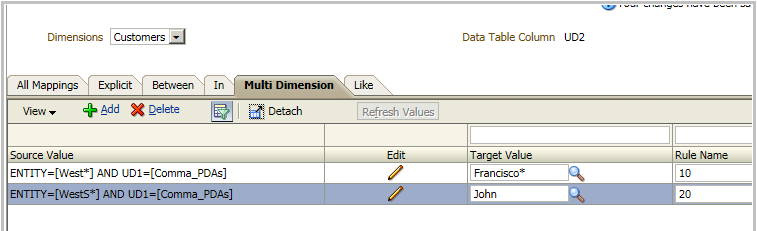
Let's add a new mapping so condition for Entity is ENTITY=[WestS*]. We rename existing mapping to 10 and new mapping will be 20.
Which one will be executed?
What if we set rule name of the new mapping to 05?
05<10 (alphabetically) ... I'm now John!
It's now time to start working with rule names if you want to use sequence in mappings.
Note: be careful with alphabetical order: a < n but N < a, 5 > 10 but 05 < 10.

MD mappings in TDATAMAP Table
As other mapping types, MD mappings are stored in TDATAMAP (and other tables during mapping import and mapping processing like TDATAMAP_T and TDATAMAP_STG)
How are MD mappings stored?
Let's see our example:
If Source Entity like West* And Source Product = "Comma_PDAs" 
Then Target Customer = "Francisco"
In the image above you can see how our GUI items (Source Value, Target Value...) are stored in TDATAMAP
Is that all? No it is not. When we create/import a MD mapping, FDMEE creates additional rows in TDATAMAP. Which? It creates one row for each condition in the source value.
To see from a technical perspective, I would like you to pay attention to column DATAKEY. I'm going to run the following SQL query (you would need to adjust for your environment) in order to get related records to my MD mapping:
As you can see we have two additional records in TDATAMAP, one for each condition, and they relate to the MD mapping by having TARGKEY value as the DATAKEY value of the MD mapping.
This approach helps to create the SQL query that FDMEE runs for the MD mapping but it as also some drawbacks. The more MD mappings you have, the more records for conditions are created. When you reach a high volume of MD mappings, you may need to look at performance and analyze the need of additional indexes in FDMEE tables like TDATASEG_T or TDATAMAP. This is something you may need to take into consideration.
So I hope next time you query your TDATAMAP table you don't get surprised due to unexpected number of records per dimension :-)

A bit of hacking for MD
When I understood how MD mappings were stored in the database I thought that having MD mappings using target column values instead of source column values might be an option.
I'm not going to detail any custom solution but I would like to share with you some ideas. I'm always fan of the statement "The more you know how the product works, the more creativeness you will have for your solutions".
I want to add a condition to my MD mapping so:
If Source Entity like West* And Source Product = "Comma_PDAs" And Target Account = "LaborCostAcc"
Then Target Customer = "Francisco"
Out of the box I cannot perform this with MD mapping (I could have #SCRIPT or #SQL mapping script instead)
But if we design a nice solution to update TDATAMAP so dimension name ACCOUNT is replaced by ACCOUNTX (Target Account Column in TADATASEG_T/TDATASEG)...
What would happen if we run the mapping process?
It seems data was mapped based on Source Entity, Source Product, and Target Account!
You don't believe, don't you? I wouldn't neither :-) but here you have the FDMEE process log. We can confirm how the SQL query has been generated by using ACCOUNTX instead of ACCOUNT:
Of course we would have to configure dimension sequence in target dimension details (Register > Target Application > Dimension Details) in order to ensure that Account is mapped before Customer dimension.
If we open the mapping to edit, you will see that condition for account dimension is not displayed correctly as we changed internally DIMNAME to ACCOUNTX and this value is not a valid one:
So if you design the solution, you would have to take care about applying value back so users can see mapping. You could use some custom syntax in condition value to indicate that the condition should be applied to target dimension and not source. For example, T_LaborCostACC. With this information you should be able to update TDATAMAP before and after applying mappings (BefProcMap and AftProcMap).
Please take into consideration that this custom solution is not 100% validated and of course it's not supported, so play this game at your own risk :-)

MD with multiple lines for same dimension
So far all logs I have shown in this post uses AND operator. The reason is that there was only one line per dimension. What about having the following condition?
Source Product = Comma_PDAs Or Source Product Like *Phones
When we add dimensions to the condition there is no impediment to add more than one condition to same dimension:
If we have a look to the syntax of MD we can see how OR operator is used for Product dimension: 
The FDMEE process log will show the UPDATE statement as we expect: 
Importing MD mappings
MD mappings can be imported from text files or Excel files as other mapping types. The only difference is about syntax.
As you can see #MULTIDIM is used to define MD mappings.

In MapLoader, you will find instructions for MD mappings:
If you export mappings to Excel, bear in mind that you cannot import that Excel as it is only for mapping review. You will have to use MapLoader or txt/csv file instead:
Exporting mappings to Excel will produce an Excel file as follows:

OK, I think it's enough for MD mappings...
And remember, I haven't said MD mappings is your solution! As always, analyze requirements and design the solution which fits better for your business. Always try to find a solution balanced in performance and maintainability.

Enjoy!

Friday, June 27, 2014

Bye bye KScope...

Back to Spain, ,back to jet lag, few days more working and then vacation :-)

I would really like to say thanks very much to all ODTUG people (Cameron, Opal, Natalie, Tony ... all of you) You really do a great job!
I really enjoyed meeting people there and attending sessions. Nice to meet personally other FDMEE guys (Doug, Tony, etc.)

Kscope has also been a great event to learn lot of things. It's great to see how people communicate and share knowledge with the audience. And not all is work...I discovered really good dancers @ EMP museum.

I've been thinking about the blog and I'm going to restructure it a little bit in order to make it more useful.

I'm going to include different post series that hopefully will help you not to be scared about FDMEE and especially Jython. Initially I will try to cover:

  • Jythoning with FDMEE (my new word...)
  • Migrating from FDM Classic
  • Tips & Tricks
  • FDMEE basics
  • Troubleshooting
  • Using Source Adapters
Any other suggestions?

Hasta pronto!

Sunday, June 22, 2014

KScope14 at Seattle - here we go!!!


KScope started today! After couple of days enjoying Seattle and San Juan Islands... it's kScope Time!
I will be attending and quite happy that I can meet lot of people.
If you want to have a chat, you can find me at Booth 312

PS. It seems that I brought nice weather from Spain :-)

Tuesday, June 17, 2014

Migrating from Classic FDM to FDMEE - Episode 0

Migrating or not migrating, that's the question :-)

I have been discussing with many customers about FDMEE migration and I would like to share my feedback with you.
First thing we need to bear in mind is that we are migrating to a "new" product based on different platform and providing several new functionality that will help us to get a better performance in our data load process.
Typical questions will be:

  • Do we have a migration tool (next > next > next ...)?
  • Can I reuse all metadata defined in my Classic FDM application (locations, import formats, etc.)?
  • What about my mappings? can I migrate them?
  • My application has lots of customization using VBScript, can I migrate them to FDMEE?
  • I have built some custom reports in FDM, can I reuse them in FDMEE?
  • What about Batch Loader?
  • So how can I migrate then?
  • and thousands more...
For me, there are two migration steps:
  1. Technical migration
  2. Functional migration
Let me clarify this. 
During the technical migration we will install FDMEE in our new architecture. We will register our source and target systems, configure credentials for ERP systems in ODI if needed, etc...
Why do I scope the rest of the migration as functional? Because I consider this migration a kind of once-in-a-lifetime opportunity to review your application design and get the best performance. Why would my application need to be reviewed? Here you have some reasons:
  • Classic FDM has some limitations that are now covered by FDMEE. For example, when multi-dimensional mappings were needed, most of the people used mapping scripts which don't perform so well. In FDMEE, we have a new mapping type called Multi-Dimensional mapping. This new mapping type will probably replace all your mapping scripts. In addition, you can use look-up dimensions in FDMEE to support your multi-dimensional mappings.
  • The more locations you have, the more you will have to maintain. With new data load rules you may simplify your location structure. Two locations for two different file types may be replaced by one location and two data load rules having each one import format.
  • Import process is almost always the bottle neck in Classic FDM. Mapping process is performed during the import process and 90% of the customers having performance issues during import follow this rule: Wrong mapping logic design -> poor performance during import (I have seen source files with 1000 rows taking more than 30 minutes...) It's a perfect chance to review your mapping logic in order to get the best performance. Make use of new mapping types!!! multi-dimensional, #SQL, and #FORMAT mask mappings.
  • You will have to re-write your scripts (import, mapping, event, and custom). Even if you keep VB for event and custom scripts, you will have to do some changes as VB Script is replaced by VB .NET. On the other hand, if you decide to use event and custom scripts in Jython...you will have to completely re-write them. Import scripts (dump) support Jython only. Integration scripts are not supported anymore as import scripts so they need to be implemented in BefImport event script (Jython or VB .NET). And lastly, VB mapping scripts are not supported anymore so you will have to re-write them as Jython or SQL mapping scripts (or replace by multi-dimensional mappings). Being said that, you will have a great opportunity to review your code which sometimes is not as efficient as you think. Also, if you forgot commenting your code, don't forget to do it now :-)
Some answers...

  • Do we have a migration tool (next > next > next ...)? Not in 11.1.2.3.x. It will be probably be included in 11.1.2.4 but we don't know what will be available for migration yet. The tool will be mainly for FDM metadata (locations, import formats, mappings...)
  • Can I reuse all metadata defined in my Classic FDM application (locations, import formats, etc.)? Yes you can. Some of them have been slightly re-designed but the core functionality is in FDMEE as well. 
  • What about my mappings? can I migrate them? Explicit, In, Between, Like mappings also exist in FDMEE. You will have to re-write your mapping scripts.
  • My application has lots of customization using VBScript, can I migrate them to FDMEE? Already answered above:-)
  • I have built some custom reports in FDM, can I reuse them in FDMEE? Crystal reports have been replaced by RTF templates created in BI Publisher. You can reuse the SQL queries but will have to rebuild the report in RTF format. I don't think migration utility will cover reports.
  • What about Batch Loader? Open batches are now available as a type of batch definition. Same functionality so you will not have many problems migrating them. 
  • So how can I migrate then? There is no unique answer for this question. It all depends on your application(s). In some cases it will be better to start from scratch in FDMEE so you can improve your design. You can also build custom SQL process to move objects such as import formats or locations between FDM and FDMEE databases.

Some advice...
  • Please, take your time for the migration
  • Review your design. Poor design in FDM will be a poor design in FDMEE so don't expect a big performance improvement if you keep it
  • Make use of new FDMEE functionality. It may take some time to rebuild your application but you will be happy with results
  • Find an experienced resource for application assessment. I would suggest someone not involved in the design of your current application. If I built the application I will hardly find any design issue
  • Work from high level to detailed level. That will help you to have a better understanding of your integration flow
  • Do you need 10 days? I would not be worry if you need some time to assess/review/migrate. Performing well during these stage will make you save lot of time/money :-)
Which is your feedback? Please comment!